

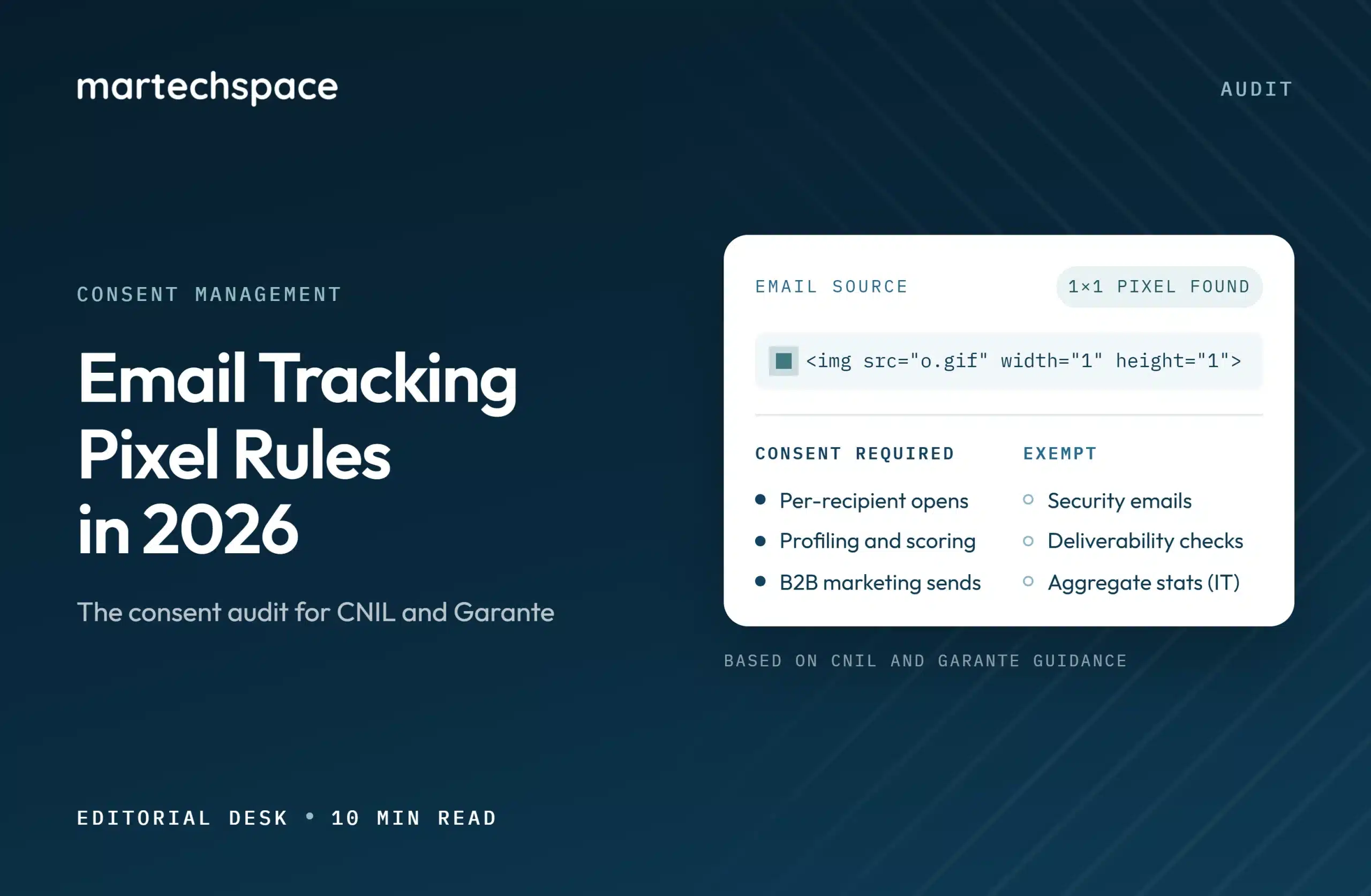
For years, the email tracking pixel sat outside most privacy programs. Cookie banners got the budget and the legal reviews. The invisible image in every newsletter that records who opened it, when, and on what device rarely came up.
That changed in 2026. France’s data protection authority, the CNIL, published its recommendation on tracking pixels in emails on 14 April 2026. Italy’s Garante adopted dedicated guidelines on 17 April 2026, with a compliance deadline at the end of October 2026. Both start from the same position: tracking an individual’s email opens requires consent, with narrow exceptions.
| Quick answer: An email tracking pixel is a tiny, usually invisible image that loads when an email is opened and reports data such as open time, device, and IP address back to the sender. Under the ePrivacy rules as read by the CNIL and the Garante, using one to measure individual opens or build profiles requires the recipient’s prior consent. Exemptions are narrow: security and authentication emails, limited deliverability measurement for emails the recipient requested, and, in Italy, anonymous aggregate statistics. Senders with European contacts should audit every pixel, sort each by purpose, and add consent and opt-out controls. |
This guide turns both texts into an audit a marketing operations team can run in two to three weeks. It is general information, not legal advice. Have your privacy counsel review the result before you change live programs.
What an email tracking pixel collects!
When a recipient’s email client loads the pixel, the request to your email platform’s server carries more than an “opened” flag. A typical setup can record:
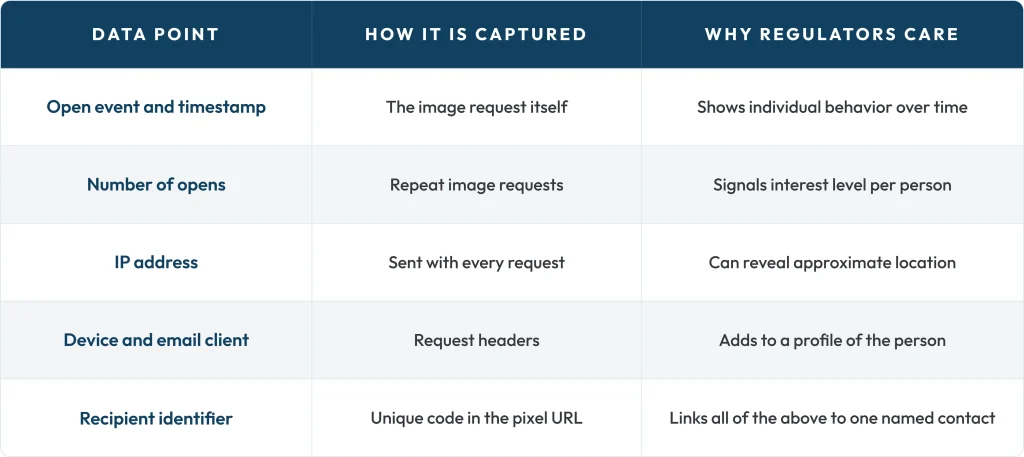
That last row is the reason the rules bite. A pixel URL that carries a unique ID or the email address itself turns an anonymous image request into personal data tied to a known individual. The European Data Protection Board confirmed in its Guidelines 2/2023, finalized in October 2024, that tracking pixels fall within Article 5(3) of the ePrivacy Directive, the same rule behind cookie consent.
What the CNIL and the Garante now require
The two authorities reach similar conclusions with different emphasis. If you send it to both France and Italy, design for the stricter reading of each row.
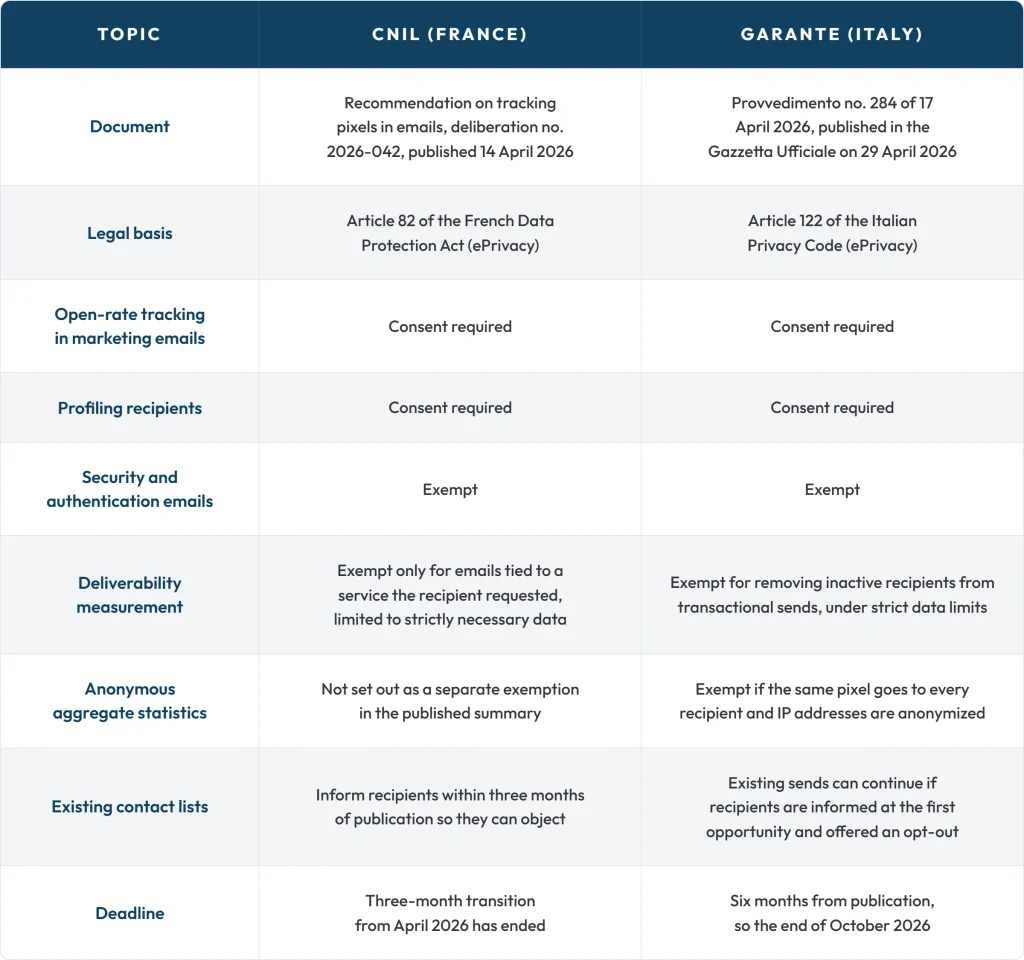
Sources: the CNIL’s announcement and summaries of the Garante measure by Iubenda and Cybersecurity360, checked on 19 October 2026. Italian commentators give the deadline as 28 or 29 October 2026, so plan to be ready before both.
B2B senders are not exempt. According to legal commentary on JD Supra, the CNIL recommendation leaves France’s B2B opt-out regime for sending marketing emails in place, but a pixel in a B2B marketing email still needs consent.
The email tracking pixel decision tree
Run every pixel in your stack through these questions in order. The first “yes” decides the outcome.
- Does the email exist only for security or authentication, such as a password reset, login code, or account activation? If yes, the pixel can be exempt. Limit it to what that purpose needs.
- Is it a transactional email the recipient asked for, and is the pixel used only to check deliverability or remove inactive recipients? If yes, it may be exempt. Store the minimum: the Garante describes keeping only the date of the last open, with no time.
- Is the pixel identical for every recipient, with IP addresses anonymized and no individual-level data stored? If yes, Italy treats it as an exempt aggregate measurement. Check French counsel before relying on this in France.
- Is the pixel used for individual open tracking, engagement scoring, lead scoring, retargeting, or sales alerts? Consent is required.
- Does the pixel belong to a third party that reuses the data for its own purposes? Consent is required, and you need to name that party in your notice.
How to audit your email tracking pixels in 7 steps
Step 1: List every sending system.
Pixels hide in more places than the main email platform. Include marketing automation, CRM email, sales engagement tools that send tracked one-to-one emails, product and transactional email services, event platforms, and any agency that sends on your behalf. Sales tools are often the largest blind spot, because reps turn on open alerts by default.
Step 2: Record what each pixel does.
For each system, note whether open tracking is on, whether the pixel URL contains a unique ID or the email address, what is stored, how long it is kept, and which reports or scores use it. The Garante expects pixel URLs not to contain the email address.
Step 3: Classify each use with the decision tree.
Mark every pixel as exempt or consent required, and write down the reason. That record is your evidence if a regulator or customer asks.
Step 4: Check your lawful basis by contact segment
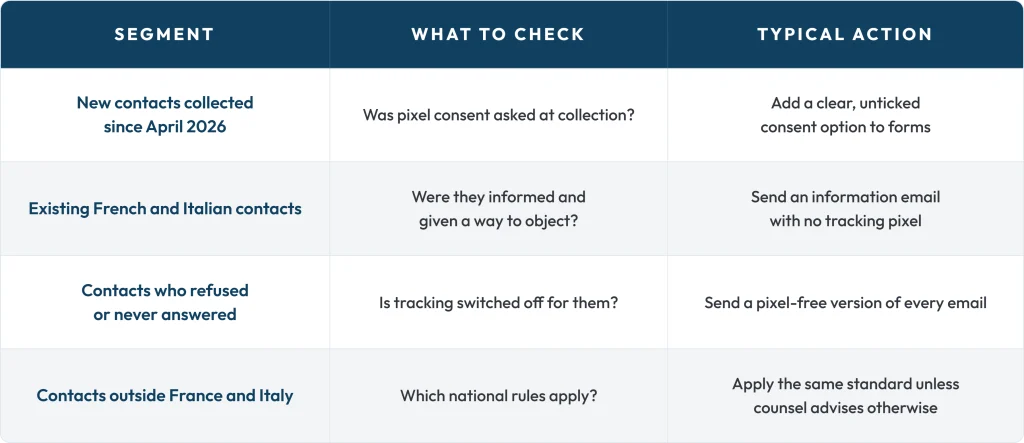
The CNIL treats inactivity as refusal: consent requires a positive action. A recipient who ignores your consent request should receive emails without tracking.
Step 5: Fix forms and notices.
Add plain-language pixel wording at the point of collection. An example to adapt with your counsel:
“Measure whether I open your emails so you can improve your content and send me less of what I ignore. You can switch this off at any time from any email.” (unticked box)
Update your privacy notice to cover what the pixel collects, the legal basis, retention, and any vendor acting as a joint controller. The Garante allows marketing and pixel consent to be combined in one request if the wording is clear and neutral.
Step 6: Build a two-level withdrawal.
Both authorities expect an easy way out. Add a “manage tracking preferences” link to the footer of every tracked email, and let recipients stop tracking without unsubscribing. Log each choice separately with a timestamp and the wording version shown. A preference center that offers “fewer emails” and “no tracking” next to “unsubscribe” keeps more contacts on your list.
Step 7: Switch your platform to consent-aware sending.
Most email platforms let you disable open tracking per email, per list, or per contact field. Create a contact property for pixel consent, sync it from your forms and consent platform, and send pixel-free versions to everyone without a “yes.” Test with seed addresses before the next campaign. If you are reviewing your email platform at the same time, our HubSpot vs ActiveCampaign comparison and HubSpot Marketing Hub review cover two common options.
What changes in your email metrics?
Open rates were already unreliable. Apple’s Mail Privacy Protection, introduced with iOS 15 in 2021, can load remote images before a person reads the email, which inflates opens. Consent rules shrink the tracked audience further. Plan to report on:
- Clicks and click-to-delivered rate, which do not rely on the email tracking pixel
- Replies, form fills, and meetings booked
- Pipeline influenced by email, from your CRM
- Open rates only for the consented segment, labeled as such
A companion article on what the CNIL and Garante rules mean for B2B email benchmarks goes deeper on reporting.
A rollout plan for the next four weeks
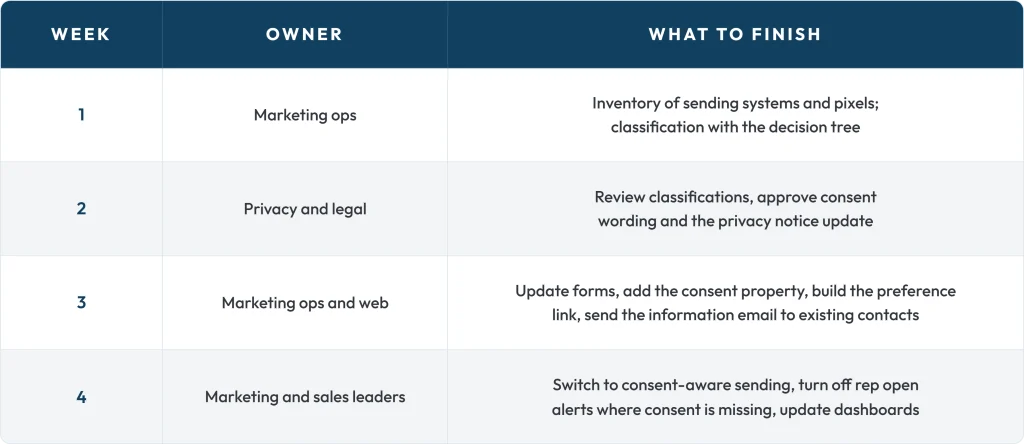
If you are choosing a platform to hold email consent alongside cookie consent, compare consent management platforms on how well they sync consent to your email and CRM tools.
FAQs:
Is an email tracking pixel legal under GDPR?
It can be, with the right basis. Under the ePrivacy rules applied by the CNIL and the Garante, individual open tracking in marketing emails needs prior consent.
Do B2B emails need consent for tracking pixels?
Yes, according to commentary on the CNIL recommendation. France’s B2B opt-out for sending marketing emails remains, but the pixel itself still needs consent.
Which email pixels are exempt from consent?
Pixels are used only for security and authentication, limited deliverability checks on requested emails, and, in Italy, anonymous aggregate statistics with one shared pixel.
What is the Garante deadline for email tracking pixels?
The Garante measure was published on 29 April 2026 with six months to comply, which puts the deadline at the end of October 2026.
Do I need new consent from my existing contacts?
Both authorities let existing sends continue if recipients are clearly informed and can easily object. New contacts must give consent at collection.
How do I measure email performance without open tracking?
Use clicks, replies, conversions, and pipeline influenced by email. Report open rates only for contacts who consented.