

Most B2B teams that buy intent data hit the same wall a few months later. The provider’s dashboard shows hundreds of accounts researching relevant topics, sales say the list is noise, and the data sits in a spreadsheet nobody opens. The problem is rarely the data. It is the missing step between a raw signal and a decision about who to call this week.
That step is an intent data scoring model: a simple, written set of rules that turns third-party intent, your own engagement data, and account fit into one number in your CRM, with a threshold that triggers action. This guide builds one from scratch, with weights, decay rules, and a calibration routine, so that sales can see why an account scored high and trust the result.
| Quick answer: Intent data scoring combines three kinds of signal at the account level: fit (does the account match your ideal customer profile), third-party intent (is it researching your topics), and first-party engagement (is it interacting with you). Give each signal points, let intent and engagement points decay over time, and set a threshold that sends an account to sales. Start simple, then recalibrate after 90 days by comparing scores with accounts that actually became opportunities. |
What intent data scoring has to answer?
A good score answers one question for a rep: should I work this account now, and why? That means the model must be explainable. If a rep cannot see which signals pushed an account over the line, they will ignore it. Three rules follow from that:
- Score accounts, not individual leads. Intent data is usually company-level, and buying decisions involve several people.
- Keep fit separate from timing. A perfect-fit account with no current activity is a target for marketing, not a call list for this week.
- Make every point traceable to a named signal and a date.
The signals worth scoring
Fit: Is this the right kind of account?
Fit comes from firmographic and technographic data: industry, employee count, region, and the tools the account already runs. Score it once and refresh it quarterly. Fit should act as a gate. Accounts below a minimum fit score should not reach sales, however much intent they show, because a surge from a company you cannot sell to wastes rep time.
Third-party intent: is the account researching your topics?
Third-party intent comes from providers that observe research activity across many websites. Bombora, for example, treats a Company Surge score of 60 or more as a statistically significant increase in research on a topic compared with the account’s own baseline and recommends pairing that with a topic threshold of at least 25% of the topics you track, according to its documentation. In plain terms: one surging topic is weak evidence; several related topics surging together is stronger.
Choose your topics carefully. Track topics that describe the problem you solve and the category you sell in, not broad industry terms that everyone reads about. Intent data scoring is only as good as the feed behind it. Our comparison of intent data providers explains how each provider collects its signals.
First-party engagement: Is the account interacting with you?
Your own data is usually the strongest timing signal: visits to pricing and comparison pages, demo or contact page views, webinar attendance, content downloads, and replies to sales emails. Weight high-intent pages far above blog visits. A pricing page visit from a known account says more than ten blog reads.
Buying group breadth
When several people from the same account engage within a short window, the odds of an active project rise. Add points for the number of distinct contacts engaging in the last 30 days, and more again when they come from different functions, such as IT and finance as well as the business team.
A starting weight and decay sheet
Use this as a first version, then adjust it with your own results. Points for intent and engagement decay, because a signal from last quarter says little about this week.
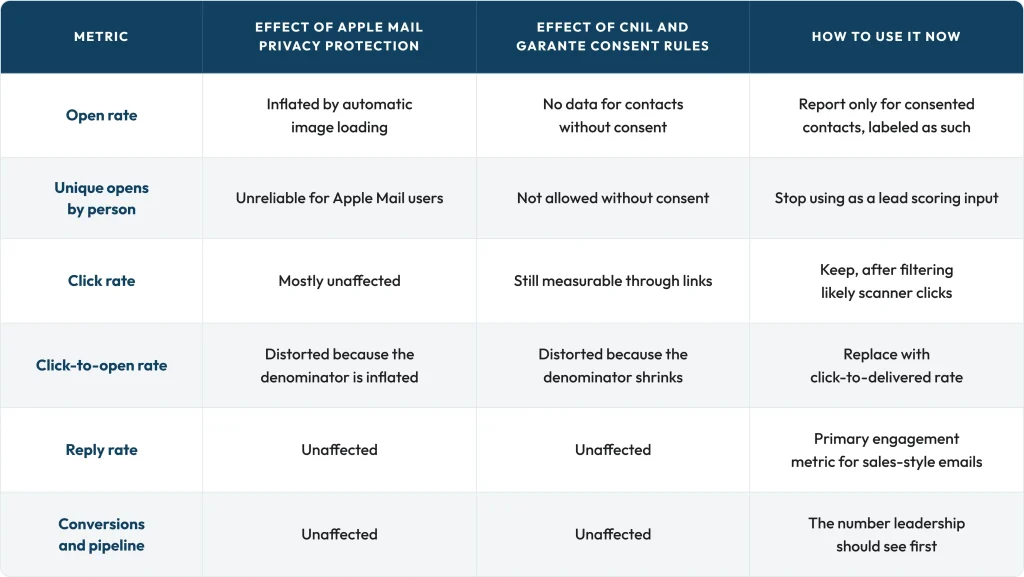
Two notes on this sheet. First, email opens are not on it: Apple Mail Privacy Protection and the 2026 consent rules have made opens unreliable, as our analysis of email open rates explains. Second, the caps matter. Without them, one researcher refreshing your pricing page can push an account over the threshold on their own.
Set thresholds and routing.
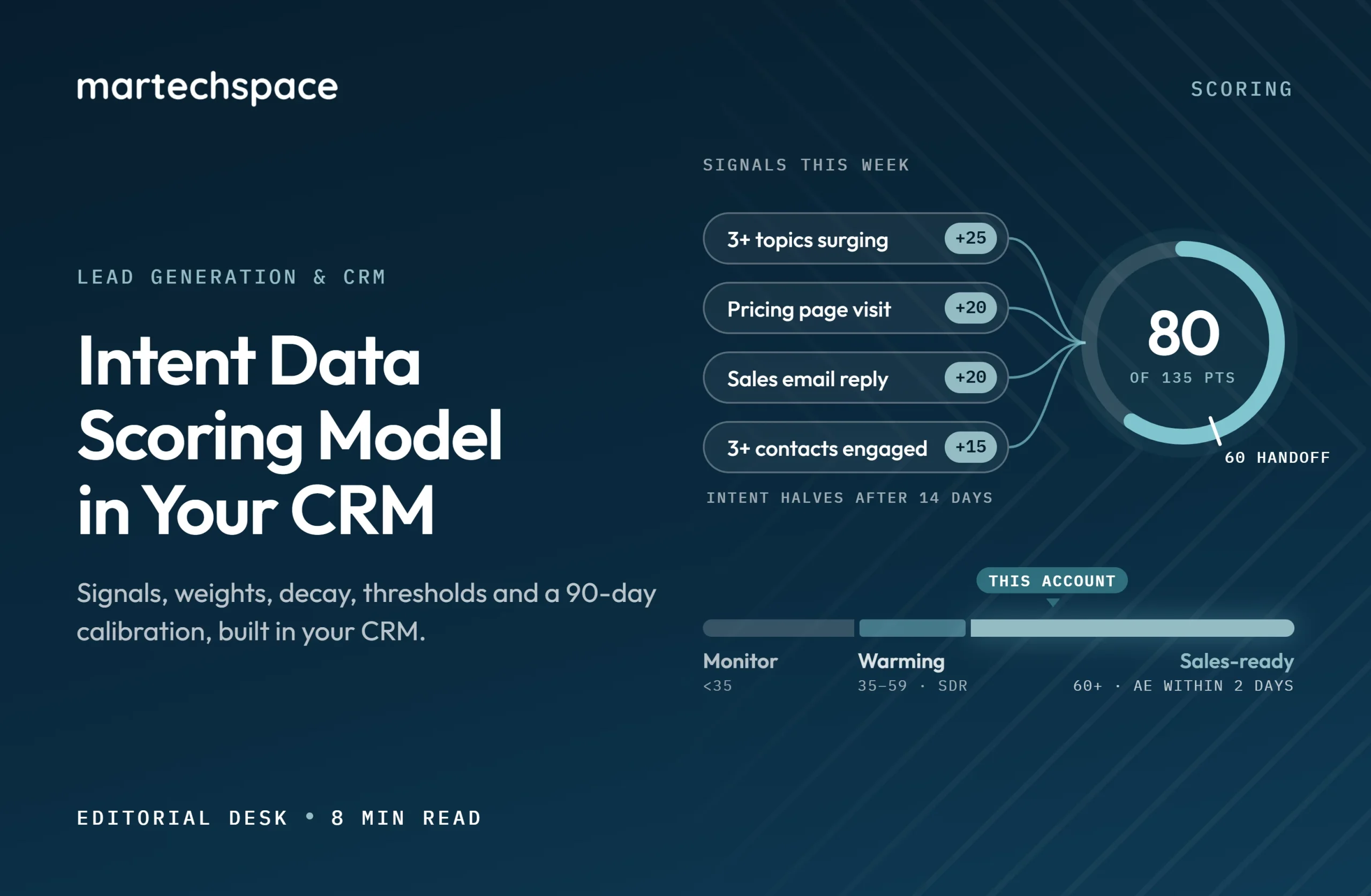
With the weights above, the maximum timing score is in the region of 135 points. A practical starting point is three bands, each with a clear owner:
- 60 points or more, with fit met: sales-ready. Route to the account owner with a task due within two business days, and show the top three signals in the task.
- 35 to 59 points, with fit met: warming. Add to targeted marketing, such as paid social and account-based ads, and an SDR research task.
- Under 35 points, or fit not met: monitor only. No sales action.
Agree on the service level with sales before launch: how fast accounts in the top band get worked, what counts as a worked account, and how reps give feedback when a score is wrong.
Build intent data scoring in your CRM.
- Create account fields for fit score, intent score, engagement score, total score, score band, and the date of the last scoring signal.
- Connect your intent provider so surging topics are written to the account record or a related object, with the date.
- Map website and marketing automation activity to accounts, not only to contacts, so anonymous-to-known visits count.
- Build the scoring logic in your CRM’s workflow or scoring tool, or in your marketing automation platform if it syncs account scores back reliably.
- Run a nightly job that applies decay and recalculates bands.
- Add a text field that lists the top three signals and their dates, and show it on the account page and in rep tasks.
- Build a report of accounts by band, with conversion to meetings and opportunities by band.
Salesforce and HubSpot both support account-level scoring through custom fields and workflows, and both connect to the main intent providers. If your team runs HubSpot, our HubSpot Marketing Hub review covers its scoring features.
A worked example
Two accounts, both meeting your fit minimum, on the same Monday:
- Account A: four tracked topics surging (25 points), two pricing page visits in the last week (40 points), one webinar attendee (10 points), and three contacts engaged from IT and operations (25 points). Total: 100 points. Sales-ready, with clear reasons.
- Account B: one topic surging 20 days ago, now halved (5 points), and one blog download last month (10 points). Total: 15 points. Monitor only.
Without intent data scoring, both accounts might appear on the same intent report. With one, the rep knows exactly where to spend the morning and why.
Calibrate after 90 days
The first version of intent data scoring is not right. After one quarter, check it against reality:
- Pull every account that reached the top band and record how many became meetings and opportunities.
- Pull every new opportunity and check what band the account was in during the 30 days before.
- Compare the signals present in converting accounts with those in accounts that went nowhere.
- Raise the weight of signals that appear often in converting accounts and cut the ones that do not.
- Adjust the threshold so the top band contains a number of accounts your reps can genuinely work each week.
Write down every change and the reason. Six months later, that log is what lets you explain the model to a new sales leader.
Common mistakes
- Scoring individual leads with company-level intent, which sends many contacts from one account to sales at once.
- Letting intent bypass fit, which fills the call list with accounts you cannot sell to.
- No decay, so accounts stay hot for months after research stopped.
- Tracking too many broad topics, which makes every large company look like it is surging.
- Hiding the reasons, so reps cannot tell a strong score from a weak one.
FAQs:
What is intent data scoring?
It is a set of rules that turns intent signals, engagement, and account fit into one score in your CRM, with a threshold that tells sales which accounts to work on now.
What is a good intent score threshold?
Start where the top band holds as many accounts as your reps can work each week, then adjust after 90 days using conversion data.
What does a Bombora surge score of 60 mean?
Bombora treats 60 or more as a statistically significant increase in an account’s research on a topic compared with its own baseline.
Should intent data be scored at the account or lead level?
At the account level. Intent data is usually company-level, and B2B purchases involve several people.
How fast should intent signals decay?
Most teams halve third-party intent points after about two weeks and remove them after about 30 days, then tune by results.
Should email opens count in the score?
No. Apple Mail Privacy Protection and consent rules make openness unreliable. Use clicks, page visits, and replies instead.